# Autodrive & Improving Performance

Here you can learn how to use and manage autodriving trains.

# Using/Configuring Autodrive

<span style="white-space: pre-wrap;">Before reading this article, we recommend reading the </span>[Paths &amp; Signals](https://zoranodensha.de/books/zora-no-densha/chapter/magnets-paths-signals "Magnets, Paths & Signals")<span style="white-space: pre-wrap;"> tutorial. </span>

## **Preparations:**

1. Configure a path on one of your signals (keep in mind that you need atleast 2 consecutive signals - ideally a "signal block" - in order for this tutorial to work). Remember the name of this path.
2. Place a locomotive infront of the signal with the configured path
3. <span style="white-space: pre-wrap;">Enter the locomotive and set it up to go forward </span>*****(but don't accelerate!)*****
4. Enter the chat and type the following command:

<table border="1" id="bkmrk-command%3A-function%3A-%2F" style="border-collapse: collapse; width: 95.1191%; border-style: solid;"><colgroup><col style="width: 20.3733%;"></col><col style="width: 79.587%;"></col></colgroup><thead><tr><td>**Command:**

</td><td>**Function:**

</td></tr></thead><tbody><tr><td>/setdest &lt;pathname&gt;

</td><td>Makes the train follow a specific user-preconfigured signal path.

***&lt;pathname&gt; must be replaced by your paths name!***

</td></tr></tbody></table>

The trains main display (by default the center display) should now start displaying upcoming/current speed limits and/or upcoming track events (stops, signals, etc.).

## **Activating Autodrive:**

<table border="1" id="bkmrk-enter-the-settings-m" style="border-collapse: collapse; width: 100%; height: 99.1834px; border-style: none; border-width: 0px;"><colgroup><col style="width: 50%;"></col><col style="width: 50%;"></col></colgroup><tbody><tr style="height: 69.7167px;"><td style="height: 69.7167px; border-width: 0px;">- <span style="white-space: pre-wrap;">Enter the settings menu of the center/right cab screen. Press on the </span><span style="color: rgb(224, 62, 45);">red</span><span style="white-space: pre-wrap;"> button.</span>

</td><td style="height: 69.7167px; border-width: 0px;">[![Home_Step1.png](https://zoranodensha.de/uploads/images/gallery/2025-07/scaled-1680-/qFzyTsyyw7uc7Kj3-home-step1.png)](https://zoranodensha.de/uploads/images/gallery/2025-07/qFzyTsyyw7uc7Kj3-home-step1.png)

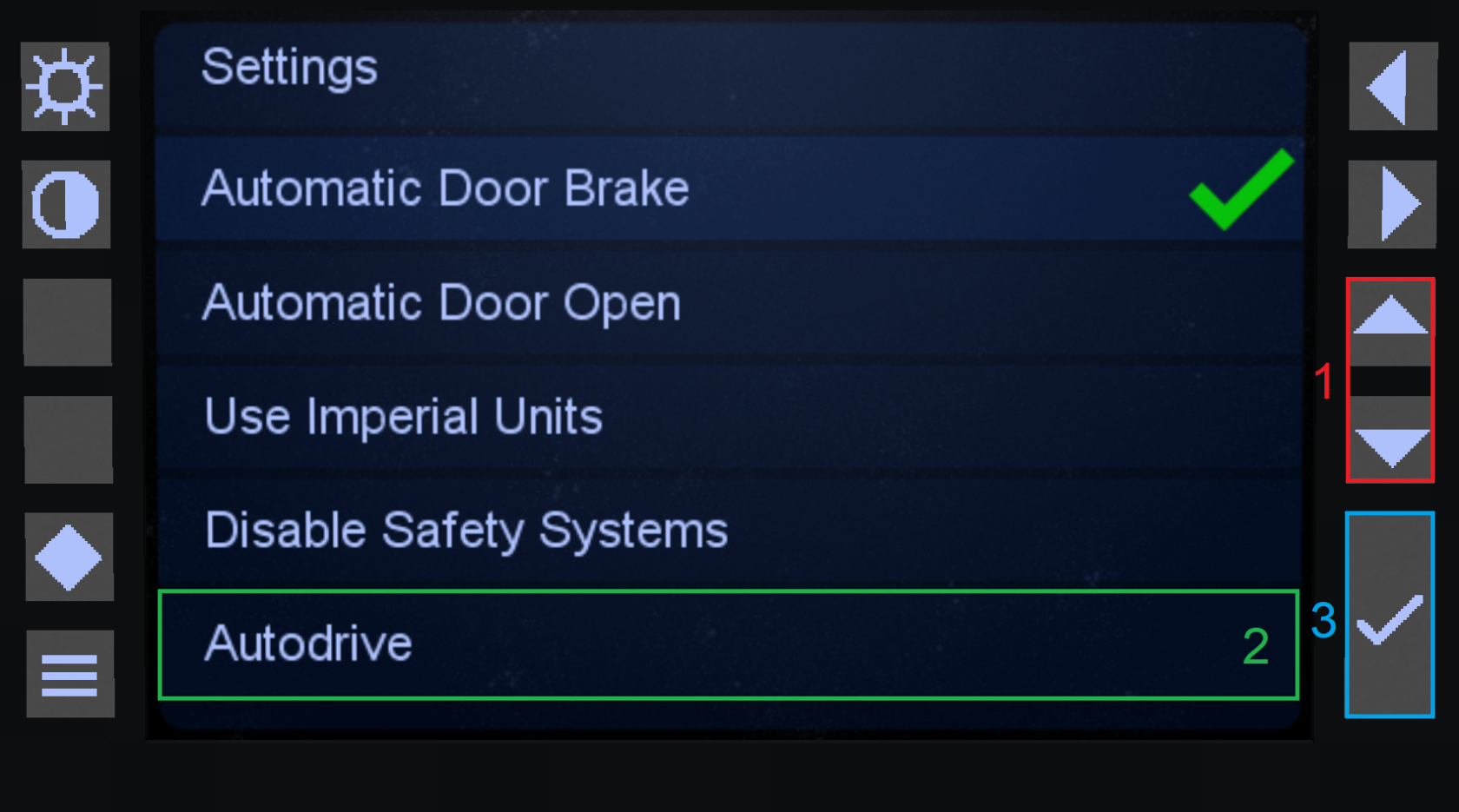
</td></tr><tr style="height: 29.4667px;"><td style="height: 29.4667px; border-width: 0px;">- Navigate to the <span style="color: rgb(45, 194, 107);">Autodrive </span>setting using the <span style="color: rgb(224, 62, 45);">up-/down arrow</span> buttons.
- Click on <span style="color: rgb(53, 152, 219);">enter </span>(the button with the checkmark)

There should now be a <span style="color: rgb(45, 194, 107);">green checkmark</span> behind "Autodrive" signalling that it is now active. The train should now start moving on its own until it cannot follow any more paths.

</td><td style="height: 29.4667px; border-width: 0px;">[![Mainmenu_Page1_Step2.png](https://zoranodensha.de/uploads/images/gallery/2025-07/scaled-1680-/Wmj8ewsIYNitx6Nl-mainmenu-page1-step2.png)](https://zoranodensha.de/uploads/images/gallery/2025-07/Wmj8ewsIYNitx6Nl-mainmenu-page1-step2.png)

</td></tr></tbody></table>

You can easily spot trains which have autodrive active through the villager in their cabs.

# Improving Performance

As autodrive trains are constantly loading chunks along their way it is recommended to get rid of these as these increasingly hog server performance.

## **Getting rid of autodrive chunks:**

Whenever server performance is starting to take a hit, you can run this command, to discard any unused loaded chunks.

<table border="1" id="bkmrk-command%3A-function%3A-%2F" style="border-collapse: collapse; width: 100%; height: 58.9334px;"><colgroup><col style="width: 25.7422%;"></col><col style="width: 74.3352%;"></col></colgroup><thead><tr style="height: 29.4667px;"><td style="height: 29.4667px;">**Command:**</td><td style="height: 29.4667px;">**Function:**</td></tr></thead><tbody><tr style="height: 29.4667px;"><td style="height: 29.4667px;">/purgetrainchunks</td><td style="height: 29.4667px;">Deletes any unused autodrive chunks.</td></tr></tbody></table>